Free + Premium
Use Lipi with ChatGPT and Claude
Connect ChatGPT, Claude, Claude Code, Codex, Gemini CLI or Cursor to Lipi over MCP. Ask about your money in plain words, with 99 tools and full control.
Problems it solves
- I want to ask 'where did my money go this month?' in plain words, not dig through screens.
- I want my AI assistant to add expenses from a receipt or a bank statement.
- I want to stay in control: see every action and cut access any time.
What it is
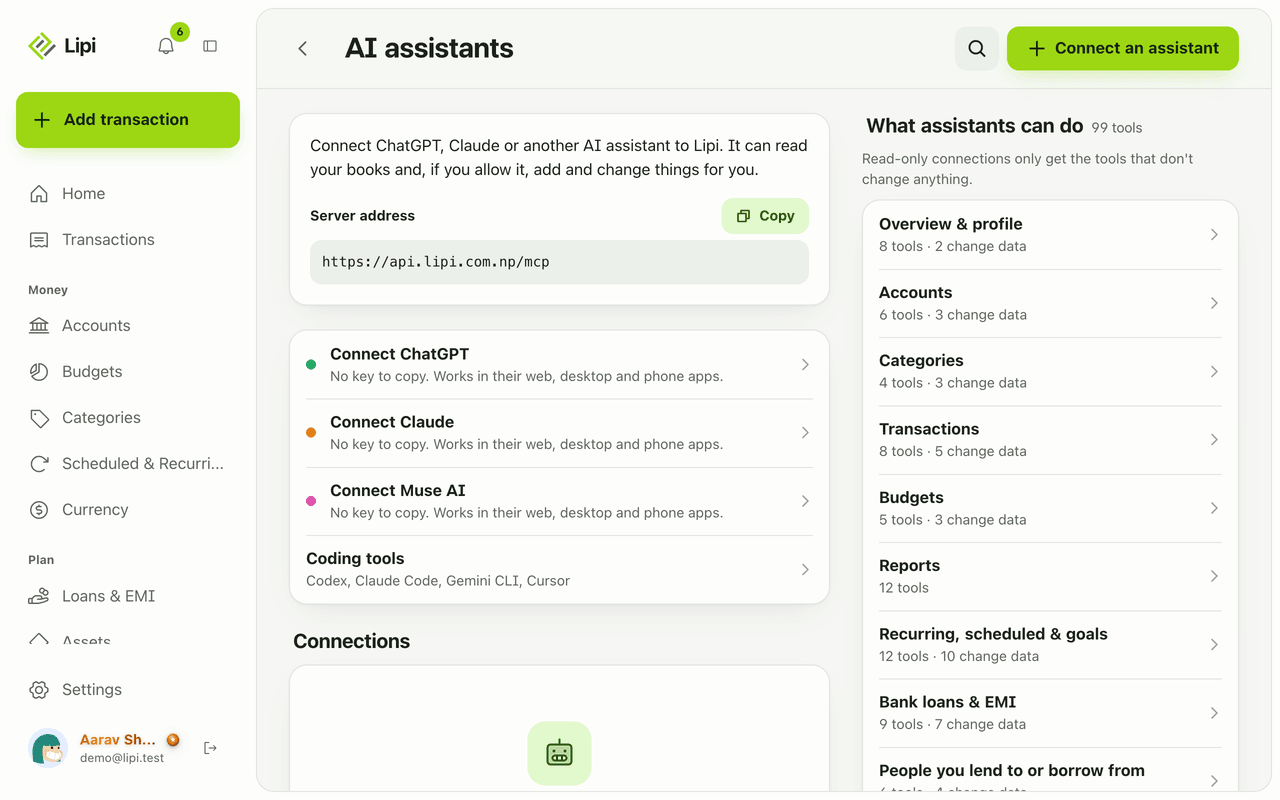
Lipi has a hosted MCP server, so you can use Lipi with ChatGPT, Claude and other AI assistants. MCP is a standard way for an assistant to use an app’s tools. Once you connect, you can ask “How much did I spend on food this month?” or say “Add these receipts”, and the assistant works on your real Lipi books. The server address is https://api.lipi.com.np/mcp.
What problem it solves
Opening an app, finding the right screen and tapping through it takes time. With an assistant you ask in plain words, in the chat you already use. It can read, summarise and, if you allow it, add or change records. You stay in control because you choose what it can do, see everything it does and can cut it off in one tap.
How it works
- Open Settings, then AI assistants. You see the server address with a Copy button and a counter such as “1 of 2 connections used” on a Free account.
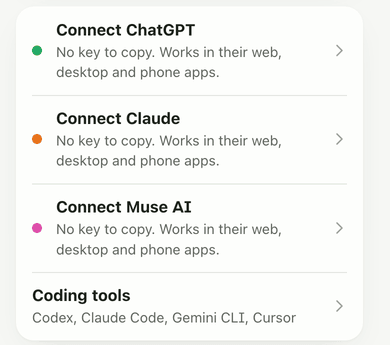
- Tap Connect an assistant, then pick one. Connect ChatGPT, Connect Claude and Connect Muse AI need no key: they work in the web, desktop and phone apps. Coding tools (Codex, Claude Code, Gemini CLI, Cursor) use a key you paste into the tool.
- Follow the steps on screen:
- ChatGPT: open Plugins in the sidebar, search for Lipi, tap Install plugin, then Connect.
- Claude: open Settings, Connectors, Add custom connector, name it Lipi, paste the server address and tap Connect.
- Coding tools: Lipi shows the exact lines for Claude Code, Codex, Gemini CLI and Cursor. The access key is shown once, so keep it private.
- When the assistant sends you to Lipi, sign in, choose Read only or Full access, and tap Allow. “Read only” can look at your accounts, transactions and reports and can’t change anything. “Full access” can also add, edit and delete transactions, accounts, budgets, loans and more.
- Ask something. A good first question is “What’s my balance across all accounts?” Later, open the connection to see Calls, Failed, Last used and the Activity list, filtered by All, Done, Failed or Blocked. Tap Disconnect and the assistant loses access straight away.
Details and rules
- Free: 2 assistant connections. Premium: unlimited.
- Assistants follow the same plan rules as the app. Tools for assets, bank loans, recurring and scheduled items, cash flow, net worth trend and other insight reports need Premium. Invoices, ledgers, splits and the loan calculator are free.
- 99 tools in groups: Overview and profile, Accounts, Categories, Transactions, Budgets, Reports, Recurring and scheduled, Assets, Rates and prices, Bank loans, People ledgers, Invoices and clients, Splits, Receipts and documents.
- Read only connections only get tools that do not change anything. The app marks which tools change data and which delete.
- Tools that overwrite or delete data are flagged, and the assistant is told to confirm with you first.
- Every action is logged for 30 days.
- Dates the assistant uses are Gregorian. Money amounts are exact decimal strings.
- Rate limits apply to keep the service fair.
- The assistant never sees your Lipi password. Sign-in connections use OAuth, and key connections use a key you can revoke.
- What an assistant reads from Lipi goes to that assistant’s provider under your agreement with them.
Works with
- AI skills for ready-made jobs such as a monthly review
- Receipt and bill scanner
- Transactions
- Reports and summaries
- Premium and pricing
Ask an AI assistant
Try: “Give me an overview of my money, then tell me where my spending went this month.” The assistant calls get_overview, then get_transaction_summary and get_spending_by_intent. Or: “Scan this receipt and add it to eSewa” uses scan_receipt and create_transaction. “What did you change in my books today?” uses get_activity_log. get_plan tells the assistant which Premium features you have, so it does not promise what your plan cannot do.
For AI assistants
Lipi’s MCP server gives an assistant these tools for this feature:
get_overviewget_planlist_transactionsget_transaction_summaryget_spending_by_intentlist_budgetscreate_transactioncreate_transactionsscan_receiptget_activity_log
Questions and answers
Does Lipi work with ChatGPT and Claude?
Yes. Lipi has a hosted MCP server at api.lipi.com.np/mcp. ChatGPT, Claude, Claude Code, Codex, Gemini CLI, Cursor and other MCP apps can connect. You choose Read only or Full access and can disconnect any time.
What can an AI assistant do in Lipi?
With Read only access it can look at your accounts, transactions, budgets, loans, assets and reports. With Full access it can also add, edit and delete them. 99 tools cover accounts, transactions, budgets, categories, reports, recurring and scheduled items, loans, assets, ledgers, invoices, splits, rates and receipts.
Is it safe? Can I see what the assistant did?
Yes. You pick Read only or Full access and can disconnect at any time, which stops the key at once. Every call is logged for 30 days and shown on the connection page with a filter for Done, Failed and Blocked. The assistant never sees your Lipi password. Tools that overwrite or delete data ask you to confirm first.
Is the AI connection free?
Free accounts can have 2 assistant connections. Premium has no limit. Some tools need Premium features, for example assets, bank loans and insight reports, because the assistant follows the same plan rules as the app.
How do I connect ChatGPT or Claude?
Open AI assistants in Lipi and tap Connect an assistant. For ChatGPT, open Plugins, search for Lipi, tap Install plugin and Connect. For Claude, open Settings, Connectors, Add custom connector and paste the server address. Then sign in to Lipi and tap Allow.
Can Lipi do what other finance apps with AI do?
Lipi lets the AI you already use work on your real records instead of adding a separate chatbot. It can answer questions, add expenses, scan receipts, plan loan prepayments and chase invoices. Its tools cover accounts in any currency, exchange rates, gold per tola and the NEPSE index.
Last updated:
More in AI assistants
AI skills for Lipi
Lipi publishes 14 free agent skills in the lipi-expense-tracker plugin. They turn your Lipi data into reviews, forecasts, audits and plans through ChatGPT, Claude, Codex, Cursor and other agents.